Beyond the UI: Understanding Modern Frontend Engineering · Part 5
New to this series? Start with Part 1
Hydration Explained: How Server-Rendered Pages Become Interactive
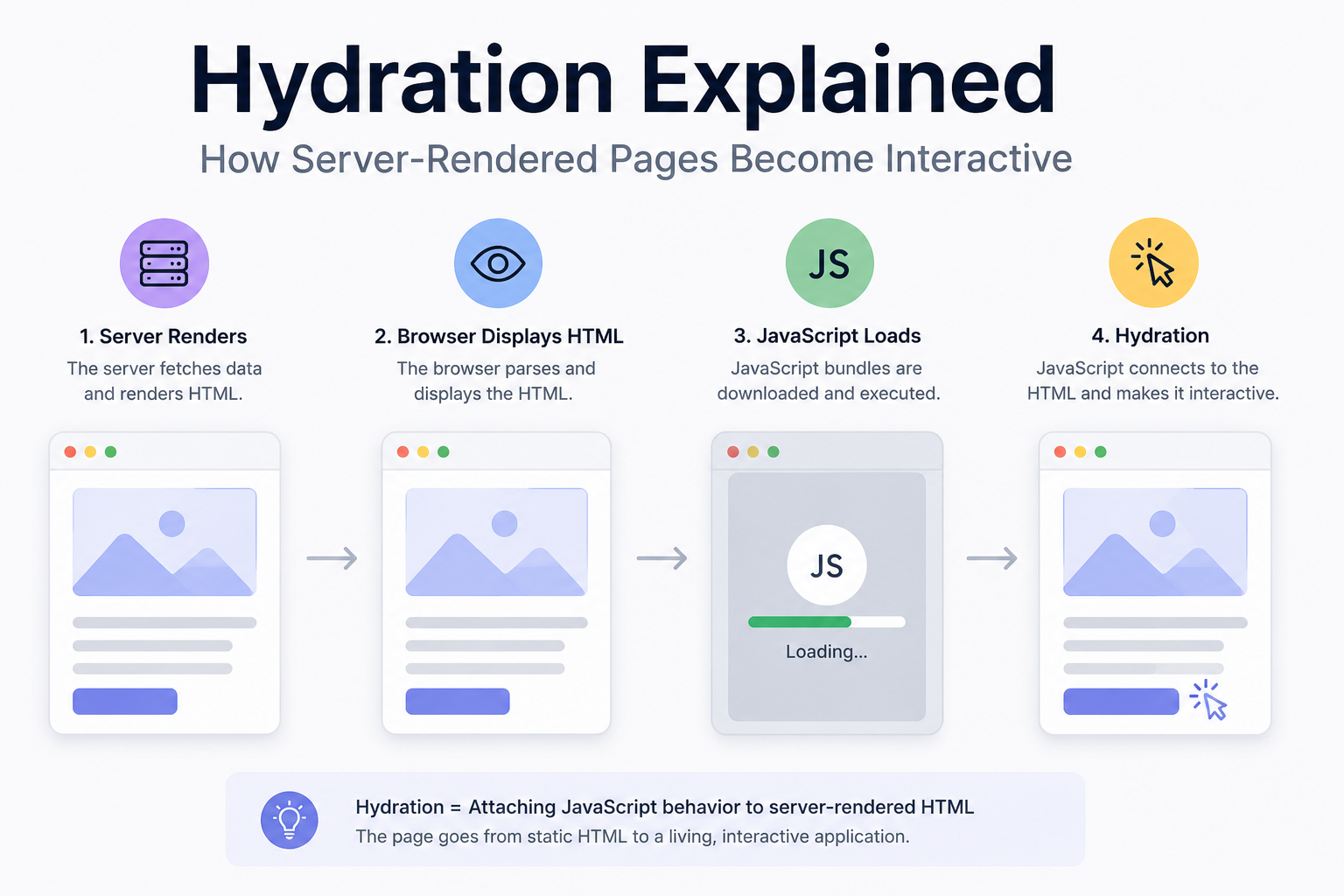
“Server-side rendering can make a page visible before JavaScript arrives. Hydration is what turns that visible HTML into an interactive application.”
In the previous article in Beyond the UI, we compared Client-Side Rendering and Server-Side Rendering.
With Client-Side Rendering, the browser might initially receive something as small as:
1
2
<div id="root"></div>
<script src="/app.js"></script>
JavaScript then constructs the interface in the browser.
With Server-Side Rendering, the server can send meaningful HTML immediately:
1
2
3
4
5
6
7
8
<article class="product">
    <h1>Mechanical Keyboard</h1>
    <p>KES 12,000</p>

    <button>
        Add to Cart
    </button>
</article>
The browser can parse and display that HTML without waiting for React, Vue, or another framework to construct it.
That sounds like the problem is solved. The user can see the product, the button is visible, and the page looks complete. But then the user clicks:
1
Add to Cart
and nothing happens. Why?
Because HTML can describe the button, but the server-rendered document doesn’t automatically contain the JavaScript behavior that your application expects.
The browser may know:
1
There is a button here.
But your framework still needs to establish:
1
2
When this button is clicked,
update the shopping cart.
That transition, from server-rendered HTML to interactive application, is where hydration comes in.
At a high level:
1
2
3
4
5
6
7
8
9
10
11
12
13
14
15
16
17
18
19
Server
   │
   ▼
Render Components
   │
   ▼
HTML
   │
   ▼
Browser Displays HTML
   │
   ▼
JavaScript Loads
   │
   ▼
Hydration
   │
   ▼
Interactive Application
Hydration sounds simple, but it introduces some of the most interesting performance and architecture challenges in modern frontend development. So let’s follow a page through the process.
First, What Exactly Is Hydration?
Hydration is the process through which client-side JavaScript attaches application behavior to HTML that was already rendered on the server.
Imagine a React component:
1
2
3
4
5
6
7
8
9
function Counter() {
    const [count, setCount] = useState(0);

    return (
        <button onClick={() => setCount(count + 1)}>
            Count: {count}
        </button>
    );
}
When server-rendered, the browser may initially receive:
1
2
3
<button>
    Count: 0
</button>
That’s perfectly valid HTML. The browser can display it.
1
2
3
┌────────────────┐
│    Count: 0    │
└────────────────┘
But the HTML response itself doesn’t contain React’s setCount function or the component’s runtime state. The browser still needs the relevant JavaScript. Once that JavaScript arrives, React can connect the existing DOM to the application.
Conceptually:
1
2
3
4
5
6
7
8
9
10
11
12
13
14
15
16
17
18
19
20
21
22
23
Existing HTML

<button>
    Count: 0
</button>

        +

Client JavaScript

Counter()
useState()
onClick()

        │
        ▼

     Hydration

        │
        ▼

Interactive Button
After hydration, clicking the button can update the state:
1
2
3
4
5
Count: 0
   │
   │ click
   ▼
Count: 1
The key idea is that the framework isn’t necessarily throwing away the server-generated HTML and starting again. It attempts to reuse the existing DOM and attach the behavior needed to make it interactive.
Why Do We Need Hydration?
Why not simply let the server render the page and leave it there? For some websites, that’s perfectly reasonable. A simple article might require almost no JavaScript. But modern applications often contain interactions such as:
1
2
3
4
5
6
7
8
9
Add to Cart
Like Post
Open Modal
Submit Form
Filter Results
Expand Menu
Update Counter
Drag Item
Search
Those interactions require application logic somewhere.
For example:
1
2
3
4
5
6
7
8
9
10
11
12
13
14
15
16
17
function AddToCart({ product }) {
    const [adding, setAdding] = useState(false);

    async function addToCart() {
        setAdding(true);

        await api.addToCart(product.id);

        setAdding(false);
    }

    return (
        <button onClick={addToCart}>
            {adding ? "Adding..." : "Add to Cart"}
        </button>
    );
}
The server can render:
1
2
3
<button>
    Add to Cart
</button>
But the browser still needs the JavaScript responsible for:
1
2
3
4
5
6
7
8
9
10
11
12
13
Click
  │
  ▼
Set loading state
  │
  ▼
Call API
  │
  ▼
Update cart
  │
  ▼
Update button
Hydration bridges the gap between HTML generated elsewhere and behavior running in the browser.
The Full Server-Rendering Journey
Let’s look at the entire process. Suppose a user requests:
1
/products/42
The server receives the request.
1
2
3
4
5
Browser
   │
   │ GET /products/42
   ▼
Server
The server fetches the product:
1
const product = await database.products.findById(42);
It renders the application:
1
<ProductPage product={product} />
which becomes HTML:
1
2
3
4
5
6
7
8
9
<main>
    <h1>Mechanical Keyboard</h1>

    <p>KES 12,000</p>

    <button>
        Add to Cart
    </button>
</main>
The response reaches the browser. Now everything we’ve discussed earlier in this series begins happening.
1
2
3
4
5
6
7
8
9
10
11
12
13
HTML
 │
 ▼
DOM
 │
 ▼
Layout
 │
 ▼
Paint
 │
 ▼
Pixels
The user sees the page. Meanwhile, JavaScript required by the application is downloaded.
1
2
3
4
5
6
7
8
9
10
11
12
13
14
15
16
17
18
HTML visible
     │
     ├──────────────► User sees content
     │
     ▼
JavaScript downloads
     │
     ▼
JavaScript parses
     │
     ▼
JavaScript executes
     │
     ▼
Hydration
     │
     ▼
Application interactive
This creates an important distinction. A page can be:
Visible
without yet being:
Fully interactive
Visible Does Not Mean Interactive
This is one of the most important concepts to understand about hydration.
Imagine the following timeline:
1
2
3
4
5
6
7
8
9
10
11
12
13
14
15
16
17
18
19
20
21
22
23
24
25
26
27
28
29
30
31
32
0ms
User requests page

      │
      ▼

300ms
HTML arrives

      │
      ▼

400ms
Content visible

      │
      ▼

800ms
JavaScript downloaded

      │
      ▼

1100ms
JavaScript executed

      │
      ▼

1300ms
Hydration completed
Between roughly:
1
400ms → 1300ms
the page may look ready.
The user can see:
1
2
3
4
5
6
7
Product

Mechanical Keyboard

KES 12,000

[ Add to Cart ]
But depending on the application and framework behavior, the client-side interaction may not yet be ready. The user sees a button. Naturally, they click it. If the required JavaScript hasn’t become operational yet, that interaction can be delayed or require special handling by the framework.
This creates an interesting UX problem:
A page can visually promise interactivity before it is ready to deliver it.
Hydration Is Not Free
SSR is sometimes described as though it simply moves rendering from the browser to the server. But with traditional hydration-heavy architectures, the browser can still have significant work to perform.
Consider this application:
1
2
3
4
5
6
7
Server
   │
   ▼
Render React Application
   │
   ▼
Send HTML
Then:
1
2
3
4
5
6
7
8
9
Browser
   │
   ├── Parse HTML
   ├── Render page
   ├── Download React
   ├── Download application JS
   ├── Parse JavaScript
   ├── Execute JavaScript
   └── Hydrate application
The server rendered the interface. But the browser may still need much of the JavaScript representation of that application so the framework can make it interactive.
In simplified form:
1
2
3
4
5
6
7
8
9
10
11
12
13
14
15
16
17
SERVER                         CLIENT

Render Components
       │
       ▼
      HTML ──────────────────► Display HTML
                                │
JavaScript ──────────────────► Download
                                │
                                ▼
                              Parse
                                │
                                ▼
                             Execute
                                │
                                ▼
                             Hydrate
For a small application, this may be cheap. For a large application, hydration can involve a significant amount of work.
The Double-Work Problem
This leads to one criticism of traditional hydration architectures.
The server does work:
1
2
3
4
Components
    │
    ▼
HTML
Then the client receives JavaScript describing much of the same application and performs additional work to reconstruct the application’s runtime representation and connect it to the existing DOM.
Conceptually:
1
2
3
4
5
6
7
8
9
10
11
12
13
14
15
16
17
18
SERVER

Component Tree
     │
     ▼
HTML


CLIENT

HTML
 +
Component JavaScript
 +
Application State
     │
     ▼
Hydration
The server rendering was useful because the user received content earlier. But the client hasn’t escaped JavaScript execution.
In some architectures, we’ve effectively said:
“Render this application on the server so users can see it quickly, then send enough JavaScript for the browser to understand much of that application again.”
This trade-off becomes increasingly noticeable as applications grow.
A React Hydration Example
Consider a small server-rendered React application.
On the server, conceptually:
1
const html = renderToString(<App />);
The resulting HTML is sent to the browser.
On the client, instead of creating a completely new DOM tree with:
1
createRoot(root).render(<App />);
a server-rendered React application can hydrate the existing DOM:
1
2
3
4
5
6
import { hydrateRoot } from "react-dom/client";

hydrateRoot(
    document.getElementById("root"),
    <App />
);
The distinction is important.
createRoot() effectively says:
Build this client application in this root.
hydrateRoot() says:
There is already server-generated HTML here. Connect React to it.
Conceptually:
1
2
3
4
5
6
7
8
9
10
11
12
13
14
15
16
17
18
19
20
21
Server HTML

<div id="root">
    <button>Count: 0</button>
</div>

        │
        ▼

hydrateRoot(...)

        │
        ▼

React connects to
existing DOM

        │
        ▼

Interactive Application
This works well when the client expects the same interface the server produced. But what happens when it doesn’t?
Hydration Mismatches
Suppose the server renders:
1
<p>Welcome back, Billy</p>
but when the client begins hydrating, React expects:
1
<p>Welcome back, Guest</p>
Now the server and client disagree. This is a hydration mismatch.
Conceptually:
1
2
3
4
5
6
7
8
9
SERVER HTML

Welcome back, Billy

        ≠

CLIENT EXPECTATION

Welcome back, Guest
Frameworks may warn about this because hydration depends on the initial server and client output being compatible. A mismatch can cause the framework to repair or re-render portions of the UI, and it can lead to confusing bugs.
How Hydration Mismatches Happen
Some mismatches are surprisingly easy to create.
Consider:
1
2
3
function CurrentTime() {
    return <p>{new Date().toLocaleTimeString()}</p>;
}
The server renders at:
1
10:42:01
By the time the browser hydrates:
1
10:42:03
The output may differ.
Another classic example is random values:
1
2
3
function Identifier() {
    return <p>{Math.random()}</p>;
}
The server might produce:
1
0.21843
while the client produces:
1
0.79216
That’s a mismatch.
Browser-only information can cause similar problems.
1
2
3
window.innerWidth
localStorage
navigator.language
Those values may not exist on the server or may differ from what the server assumed.
A More Subtle Example: Authentication
Suppose the server knows the user is authenticated. It renders:
1
2
3
4
<nav>
    <span>Welcome Billy</span>
    <button>Logout</button>
</nav>
But your client-side authentication store initially starts with:
1
const user = null;
The client expects:
1
2
3
<nav>
    <button>Login</button>
</nav>
Again:
1
2
3
4
5
6
7
8
9
10
11
Server
   │
   └── Authenticated

Client initial state
   │
   └── Not authenticated

        ↓

Hydration mismatch
The solution is often to make sure the initial client state is derived from the same data used to generate the server output.
Conceptually:
1
2
3
4
5
6
7
8
9
10
11
Server Data
    │
    ├── Render HTML
    │
    └── Serialize initial state
              │
              ▼
            Client
              │
              ▼
           Hydration
The server and client need to agree about what the initial page represents.
Why Hydration Can Become Expensive
Imagine a large e-commerce homepage containing:
1
2
3
4
5
6
7
8
9
10
Header
Navigation
Search
Hero
Recommendations
Categories
Products
Reviews
Newsletter
Footer
Suppose only a few parts are actually interactive:
1
2
3
4
Search
Cart
Product carousel
Newsletter form
With a traditional full-page hydration model, the browser may still receive JavaScript for a much larger component tree.
Conceptually:
1
2
3
4
5
6
7
8
9
10
11
12
13
14
15
Page
│
├── Header
├── Navigation
├── Hero
├── Categories
├── Products
├── Reviews
├── Newsletter
└── Footer

        │
        ▼

Hydrate Everything
But much of the page may simply be content. The hero doesn’t necessarily need client-side JavaScript, the footer probably doesn’t need React state, and a product description may never change after rendering. So why hydrate everything?
That question has driven several newer frontend architecture ideas.
Partial Hydration
Instead of hydrating the entire page, what if we hydrate only the interactive parts?
Imagine:
1
2
3
4
5
6
7
8
9
10
11
12
13
14
15
Page
│
├── Header
│
├── Search ◄──── HYDRATE
│
├── Hero
│
├── Product Grid
│
├── Cart Button ◄ HYDRATE
│
├── Article Content
│
└── Footer
Now static content remains HTML. Interactive pieces receive JavaScript.
Conceptually:
1
2
3
4
5
6
7
8
Server HTML
│
├── Static
├── Static
├── Interactive Island + JS
├── Static
├── Interactive Island + JS
└── Static
This is broadly the idea behind partial hydration and related “islands” architectures.
The goal is straightforward:
Don’t ship JavaScript for parts of the page that don’t need JavaScript.
Islands Architecture
Astro is well known for popularizing this model.
Imagine a page:
1
2
3
4
5
6
7
8
9
10
11
12
13
┌───────────────────────────────────────┐
│              Header                   │
├───────────────────────────────────────┤
│                                       │
│          Static Article               │
│                                       │
│       No client JS required           │
│                                       │
├───────────────────────────────────────┤
│       Interactive Comments            │ ◄── JS
├───────────────────────────────────────┤
│              Footer                   │
└───────────────────────────────────────┘
The interactive component becomes an island inside mostly static HTML.
Instead of:
1
2
3
4
Entire Page
    │
    ▼
Hydrate Everything
we get:
1
2
3
4
5
6
7
8
Static HTML
    │
    ├── Interactive Island
    │        │
    │        ▼
    │     Hydrate
    │
    └── Static HTML
For content-heavy sites, this can dramatically reduce the amount of client JavaScript required.
Lazy Hydration
Even when a component needs JavaScript, it doesn’t necessarily need it immediately. Consider a comments section at the bottom of a long article. The user might never scroll that far. Hydrating it immediately means spending resources on something the user may never interact with. Instead, hydration can be delayed until a condition is met.
For example:
1
2
3
4
5
6
7
8
9
10
11
12
13
14
15
16
Page Loads
    │
    ▼
Comments not visible
    │
    ▼
Do nothing
    │
    │
User scrolls
    │
    ▼
Comments approach viewport
    │
    ▼
Load / Hydrate
Other triggers could include:
1
2
3
4
When visible
When browser is idle
When user interacts
After important content is ready
This shifts hydration from:
Hydrate everything now.
to:
Hydrate something when there’s a reason to.
Selective Hydration
Another approach is selective hydration.
Suppose a page has several sections waiting to hydrate.
1
2
3
4
5
Header
Product Details
Reviews
Recommendations
Footer
The user clicks something in the header before everything else has completed. Instead of requiring hydration to proceed strictly from top to bottom, a framework can prioritize the part relevant to the user’s interaction.
Conceptually:
1
2
3
4
5
6
7
8
9
10
11
12
13
14
Hydration Queue

Product Details
Reviews
Recommendations
Header
Footer

User clicks Header

        │
        ▼

Prioritize Header
The broader principle is important:
Not all parts of a page are equally urgent.
Modern rendering architectures increasingly try to schedule work according to what matters most to the user.
Streaming Makes Things Even More Interesting
Traditional SSR can look like:
1
2
3
4
5
6
7
8
9
10
Request
   │
   ▼
Fetch EVERYTHING
   │
   ▼
Render EVERYTHING
   │
   ▼
Send HTML
If one slow data source takes two seconds, the entire page might wait. Streaming SSR allows the server to begin sending useful parts of the page earlier.
Conceptually:
1
2
3
4
5
6
7
8
9
10
11
12
Request
   │
   ▼
Server

Header ready ───────────────► Browser

Main content ready ─────────► Browser

Recommendations still loading...

Recommendations ready ──────► Browser
Instead of one giant response arriving after everything is complete, HTML can arrive progressively. Combine that with modern hydration techniques and you get something closer to:
1
2
3
4
5
6
7
8
9
10
11
12
13
HTML arrives
     │
     ▼
Content appears
     │
     ▼
More HTML streams
     │
     ▼
Relevant JavaScript arrives
     │
     ▼
Interactive regions hydrate
The line between “loading” and “loaded” becomes much less binary.
React Server Components Change the Question
React Server Components take a more fundamental approach.
Consider:
1
2
3
4
5
6
7
8
function ProductDescription({ product }) {
    return (
        <section>
            <h1>{product.name}</h1>
            <p>{product.description}</p>
        </section>
    );
}
If this component doesn’t need:
1
2
3
4
State
Effects
Browser APIs
Event handlers
why does its component JavaScript need to run in the browser? With Server Components, it may not.
Conceptually:
1
2
3
4
5
6
7
8
9
10
11
12
13
14
15
16
17
18
19
SERVER

ProductDescription
Reviews
ProductDetails

        │
        ▼

Rendered representation

        │
        ▼

CLIENT

AddToCartButton
Search
Cart
Only components that require client-side behavior need to become part of the browser’s interactive JavaScript application.
This changes the conversation from:
How do we hydrate the entire server-rendered application efficiently?
toward:
How much of this application needs hydration at all?
That’s a much more powerful question.
Server Components vs Hydration
It’s worth separating the concepts.
A traditional server-rendered client component might go through:
1
2
3
4
5
6
7
8
9
10
Server Render
     │
     ▼
HTML
     │
     ▼
Browser
     │
     ▼
Hydration
A server-only component doesn’t need to become an interactive client component.
1
2
3
4
5
6
7
8
9
10
11
12
13
14
Server Component
     │
     ▼
Server
     │
     ▼
Rendered output
     │
     ▼
Browser

No equivalent component
JavaScript required
for hydration
But interactive client components still need browser JavaScript.
For example:
1
2
3
4
5
6
7
8
9
10
11
"use client";

function AddToCart() {
    const [quantity, setQuantity] = useState(1);

    return (
        <button onClick={() => add(quantity)}>
            Add to Cart
        </button>
    );
}
So a modern page may contain both:
1
2
3
4
5
6
7
Server Components
       │
       └── No client hydration for their component logic

Client Components
       │
       └── Need client-side JavaScript / hydration
Again, modern frontend architecture is increasingly about choosing boundaries.
Hydration and the Main Thread
Now let’s connect hydration to our previous article on the JavaScript event loop.
Suppose the browser downloads a large JavaScript bundle. It needs to:
1
2
3
4
5
6
7
8
9
10
11
12
13
Download
   │
   ▼
Parse
   │
   ▼
Compile
   │
   ▼
Execute
   │
   ▼
Hydrate
Much of that work interacts with the browser’s main thread.
If hydration becomes expensive:
1
2
3
4
5
6
7
8
9
Main Thread

┌──────────────────────────────┐
│      JavaScript              │
├──────────────────────────────┤
│      Hydration               │
├──────────────────────────────┤
│      More Hydration          │
└──────────────────────────────┘
user interactions may have to compete with that work.
Remember our earlier lesson:
A page can look ready while JavaScript is still occupying the main thread.
This is why shipping less JavaScript isn’t merely about reducing network transfer.
It can also mean:
1
2
3
4
5
Less parsing
Less compilation
Less execution
Less hydration
Less main-thread work
The network is only part of the cost.
Hydration and the Rendering Pipeline
Hydration also connects directly to our first two articles. Hydration may update DOM state, DOM updates can invalidate styles, some updates may trigger layout, and layout changes may require painting. So the full picture can become:
1
2
3
4
5
6
7
8
9
10
11
12
13
14
15
16
17
18
19
20
21
22
23
24
25
26
27
28
Server HTML
     │
     ▼
Browser Parses HTML
     │
     ▼
Initial Render
     │
     ▼
JavaScript Loads
     │
     ▼
Hydration
     │
     ▼
DOM / State Updates
     │
     ▼
Style
     │
     ▼
Layout
     │
     ▼
Paint
     │
     ▼
Composite
The concepts in this series aren’t isolated. They form one system.
Why Huge JavaScript Bundles Hurt SSR Too
Imagine two applications. Both server-render their HTML in:
1
300ms
Application A sends:
1
80 KB JavaScript
Application B sends:
1
2 MB JavaScript
Both might display meaningful content quickly. But the browser still has very different workloads.
1
2
3
4
5
6
7
8
9
10
11
12
13
14
15
16
17
18
19
20
21
22
23
24
25
26
27
28
29
30
31
32
33
34
35
Application A

HTML
 │
 ▼
Small JS
 │
 ▼
Hydrate
 │
 ▼
Interactive


Application B

HTML
 │
 ▼
Large JS
 │
 ▼
Download
 │
 ▼
Parse
 │
 ▼
Execute
 │
 ▼
Hydrate
 │
 ▼
Interactive
This is why saying:
“We’re using SSR, so initial performance is solved.”
can be misleading. SSR addresses only part of the journey.
What About Event Handlers?
A common simplified explanation of hydration says:
“Hydration attaches event listeners to server-rendered HTML.”
That’s useful as an introduction, but hydration generally involves more than literally walking through every element and calling addEventListener. Frameworks have different event systems and hydration strategies. For example, React uses event delegation for many events.
The more accurate mental model is:
Hydration connects server-rendered DOM with the client framework’s runtime representation so that state, events, and future updates can behave correctly.
Think:
1
2
3
4
5
6
7
8
9
10
Static Server DOM

        +

Client Application Runtime

        │
        ▼

Connected Interactive UI
rather than simply:
1
HTML + click handlers
Hydration Errors Are Architecture Clues
When developers encounter hydration warnings, the instinct is often to silence them. But a mismatch can reveal an architectural problem.
For example:
1
2
3
4
5
function Theme() {
    const theme = localStorage.getItem("theme");

    return <div className={theme}>...</div>;
}
This code assumes browser storage exists. The server cannot make the same assumption. If the component participates in SSR, you need to think carefully about where that value should come from and when it should be read.
Likewise:
1
<p>{window.innerWidth}</p>
asks for browser-specific state during rendering.
Hydration forces us to confront a fundamental reality:
1
2
3
Server Environment
       ≠
Browser Environment
Code that crosses that boundary needs to be designed accordingly.
A Practical Example: Theme Preference
Suppose a user prefers dark mode. The browser has:
1
localStorage.setItem("theme", "dark");
But the server doesn’t have access to that browser storage. It renders:
1
<body class="light">
Then the browser loads JavaScript and discovers:
1
Theme = dark
The page switches:
1
2
3
4
Light
  │
  ▼
Dark
The user may see a flash of the wrong theme. This isn’t necessarily a hydration problem alone, but it demonstrates how server/client differences can become visible.
One solution might be storing the preference in a cookie the server can read.
Then:
1
2
3
4
5
Cookie
  │
  ├────► Server renders dark
  │
  └────► Client initializes dark
Both sides agree.
This illustrates a broader principle:
The closer server and client are to sharing the same initial truth, the smoother hydration becomes.
A Practical Example: Responsive Rendering
Suppose the server tries to render different markup for mobile and desktop.
1
2
3
4
5
if (window.innerWidth < 768) {
    return <MobileNavigation />;
}

return <DesktopNavigation />;
There’s an immediate problem. On the server, window doesn’t exist. You could guess based on request information, but that guess may differ from the browser’s actual environment.
A safer solution is often letting CSS handle purely visual responsive differences:
1
2
3
4
5
6
7
8
9
10
11
12
13
14
15
16
17
.desktop-nav {
    display: block;
}

.mobile-nav {
    display: none;
}

@media (max-width: 768px) {
    .desktop-nav {
        display: none;
    }

    .mobile-nav {
        display: block;
    }
}
The server can produce stable markup while the browser’s CSS handles presentation.
Hydration encourages developers to distinguish between:
1
2
3
4
5
Application state

and

Presentation state
Not every browser difference needs to become JavaScript logic.
When Hydration Is Worth the Cost
After discussing all these problems, hydration can sound like something we should avoid completely. That’s not the lesson.
Hydration provides an extremely useful combination:
1
2
3
4
5
Fast server-rendered content

        +

Rich client-side interaction
For many applications, that’s exactly what we want. Imagine an e-commerce product page.
Users benefit from seeing:
1
2
3
4
5
Product Name
Image
Price
Description
Reviews
as early as possible.
But they also need:
1
2
3
4
5
Add to Cart
Choose Variant
Save Product
Update Quantity
Interactive Gallery
Server rendering plus hydration can provide both.
The question isn’t:
Is hydration bad?
The better question is:
How much hydration does this page actually need?
When You May Not Need Hydration
Suppose you’re building a documentation page.
It contains:
1
2
3
4
5
Heading
Paragraphs
Code examples
Images
Links
Perhaps the only interaction is copying code. Do you really need a full client-side framework runtime for the entire page? Possibly not.
You might send static HTML and use a tiny amount of JavaScript for:
1
2
3
Copy Button
Search
Theme Toggle
Likewise, a marketing page may need only:
1
2
3
Mobile menu
Newsletter form
Analytics
The rest can remain HTML and CSS.
A powerful frontend optimization is sometimes simply:
Don’t make static content into a JavaScript application unless it needs to be one.
Hydration Strategies Compared
We can summarize the main ideas.
Full Hydration
1
2
3
4
Entire Page
    │
    ▼
Hydrate
Simple mental model, but potentially more client-side work.
Partial Hydration
1
2
3
4
5
Page
├── Static
├── Interactive ◄── Hydrate
├── Static
└── Interactive ◄── Hydrate
Only interactive regions hydrate.
Lazy Hydration
1
2
3
4
5
6
7
Interactive Component
        │
        ▼
Wait until needed
        │
        ▼
Hydrate
Hydration is delayed.
Selective Hydration
1
2
3
4
5
6
7
Several regions waiting
        │
        ▼
User interacts
        │
        ▼
Prioritize relevant region
Urgent parts can receive attention first.
Server-Only Components
1
2
3
4
5
6
7
8
9
10
Component
    │
    ▼
Server
    │
    ▼
Rendered output

No client component
runtime required
Instead of optimizing hydration, avoid needing it for that component. These strategies aren’t necessarily mutually exclusive. Modern frameworks can combine several of them.
The Bigger Trend: Ship Less JavaScript
For years, frontend development often moved in one direction:
1
2
3
4
5
6
7
More application logic
        │
        ▼
More JavaScript
        │
        ▼
More client rendering
The industry is increasingly reconsidering that default.
Modern architectures ask:
1
2
3
4
5
6
7
8
9
10
Does this code need to run
in the browser?

        │
   ┌────┴────┐
   │         │
  Yes        No
   │         │
   ▼         ▼
Client      Server
That doesn’t mean JavaScript is going away. Far from it. Rich interfaces still depend heavily on it. But we can become more intentional about which JavaScript users actually need to download and execute.
Hydration is central to that conversation.
How to Think About Hydration Performance
When profiling a server-rendered application, don’t look only at how quickly HTML arrives. Think about the whole lifecycle.
1
2
3
4
5
6
7
8
9
10
11
12
13
14
15
16
17
18
19
20
21
22
Request
   │
   ▼
Server Rendering
   │
   ▼
HTML Arrives
   │
   ▼
Content Visible
   │
   ▼
JavaScript Downloads
   │
   ▼
JavaScript Executes
   │
   ▼
Hydration
   │
   ▼
Interaction Ready
Ask:
- How much JavaScript are we shipping?
- How much of it is needed immediately?
- Which components actually require client-side behavior?
- Is hydration producing long tasks?
- Can below-the-fold functionality wait?
- Are server and client producing the same initial state?
- Can static sections remain server-only?
- Are we measuring interaction responsiveness, not just page visibility?
Those questions are much more useful than simply asking whether SSR is enabled.
Connecting Everything We’ve Learned
We’re now four articles into Beyond the UI, and the pieces are beginning to connect.
First, we learned how browsers create pixels:
1
2
3
4
5
6
7
8
9
10
11
12
13
14
15
16
HTML
 │
 ▼
DOM
 │
 ▼
Render Tree
 │
 ▼
Layout
 │
 ▼
Paint
 │
 ▼
Composite
Then we learned how DOM and style changes can trigger expensive rendering work:
1
2
3
Reflow
Repaint
Compositing
Then we explored how JavaScript competes for time on the main thread:
1
2
3
4
Tasks
Microtasks
Event Loop
Rendering
Then we moved rendering to the server:
1
2
3
4
CSR
SSR
SSG
Hybrid Rendering
And now hydration connects those worlds:
1
2
3
4
5
6
7
8
9
10
11
12
13
14
15
16
17
18
19
20
21
22
SERVER

Components
    │
    ▼
HTML

    │
    ▼

BROWSER

HTML becomes visible
    │
    ▼
JavaScript arrives
    │
    ▼
Hydration
    │
    ▼
Interactive application
Frontend performance isn’t one thing. It’s the result of all these systems interacting.
Bringing It All Together
Hydration exists because server-rendered HTML and client-side applications solve different parts of the user experience.
Server rendering can give us:
1
2
3
Content quickly
SEO-friendly HTML
Useful initial document
Client JavaScript gives us:
1
2
3
4
5
State
Events
Interactions
Dynamic updates
Rich application behavior
Hydration connects them.
1
2
3
4
5
6
7
8
9
10
Server-Rendered HTML
          │
          │
          ├──── Client JavaScript
          │
          ▼
       Hydration
          │
          ▼
Interactive Application
But that connection has a cost. JavaScript must be transferred, parsed, and executed. The framework must connect itself to the server-rendered DOM, and the server and client must agree on what that initial DOM should represent.
That’s why newer frontend architectures increasingly ask whether every part of a page needs hydration at all.
Sometimes the best hydration optimization is:
1
Hydrate later.
Sometimes it’s:
1
Hydrate only this component.
And sometimes it’s:
1
Don't hydrate this component.
Final Thoughts
Hydration is easy to miss because, when everything works properly, the user never sees it. A page arrives, content appears, buttons work, and the application feels alive. But between those moments, the browser may be doing substantial work.
Understanding hydration helps explain why a server-rendered website can still ship too much JavaScript, why a visible page can still feel unresponsive, why server/client differences produce strange warnings, and why modern frameworks are becoming increasingly interested in server-only components, islands, streaming, and selective hydration.
Most importantly, hydration teaches us another lesson that keeps appearing throughout this series:
Frontend performance isn’t about making one stage fast. It’s about reducing unnecessary work across the entire journey from server to interaction.
The server can generate HTML in 50 milliseconds. The browser can paint it immediately. But if the user then has to wait while megabytes of JavaScript are downloaded, parsed, executed, and hydrated, we’ve optimized only part of the experience.
The real goal is not simply:
How quickly can we render the page?
It’s:
How quickly can we give the user a page that is both useful and ready to respond?
What’s Next?
We’ve now seen how a server-rendered application becomes interactive. But once the application is alive, another problem quickly appears. Where should all of its data live?
A simple component might have a boolean:
1
const [open, setOpen] = useState(false);
Then another component needs the same information, another page needs user data, the URL represents filters, API responses need caching, and forms have their own state.
Before long, everything seems to be called “state” even though these values have completely different lifecycles and responsibilities.
So next in Beyond the UI:
State Management Explained: Why Frontend State Gets Complicated
We’ll explore local state, shared state, server state, URL state, form state, and derived state, and why the solution to frontend state management isn’t simply putting everything into one global store.