Beyond the UI: Understanding Modern Frontend Engineering · Part 4
New to this series? Start with Part 1
Client-Side Rendering vs Server-Side Rendering Explained: Where Should Your UI Be Built?
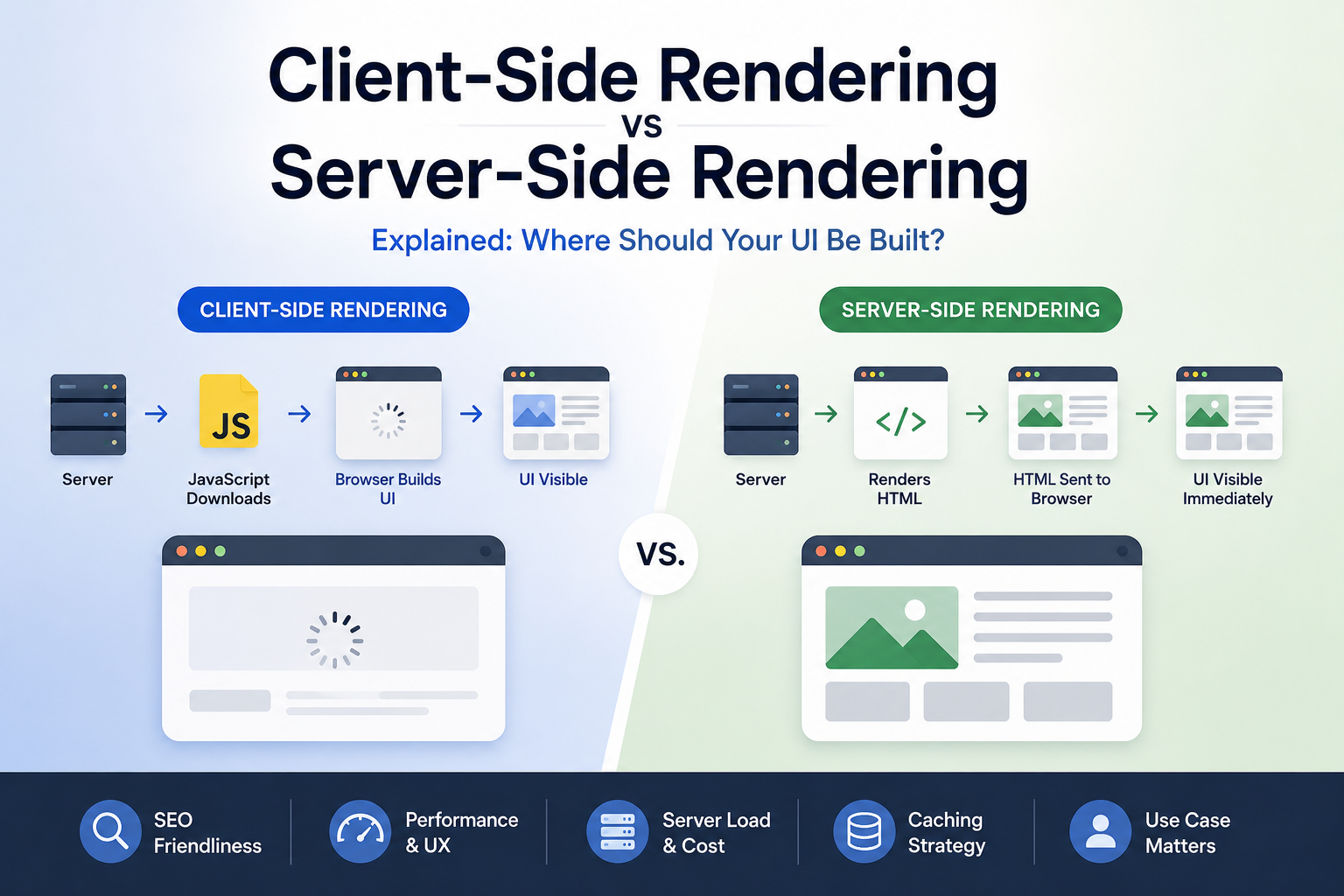
“Every web application eventually becomes HTML in the browser. The interesting question is where that HTML should be created.”
Open two modern websites in your browser. They may look almost identical: both have navigation bars, product cards, forms, dashboards, buttons, and interactive components, and both may even be built using React. But underneath, the journey those interfaces took before appearing on your screen could be completely different.
One application might send the browser a relatively small HTML document:
1
2
3
<div id="root"></div>

<script src="/app.js"></script>
JavaScript downloads, executes, fetches data, builds the interface, and inserts it into the page.
Another application might send this immediately:
1
2
3
4
5
6
7
8
<main>
    <h1>Products</h1>

    <article>
        <h2>MacBook Pro</h2>
        <p>KES 250,000</p>
    </article>
</main>
The browser already has meaningful content before the application’s JavaScript finishes loading.
The first approach is broadly known as Client-Side Rendering (CSR), and the second is Server-Side Rendering (SSR).
At first, the difference sounds simple:
1
2
3
4
5
6
7
8
9
CSR

Server
  │
  ▼
JavaScript
  │
  ▼
Browser builds UI
versus:
1
2
3
4
5
6
7
8
9
SSR

Server builds UI
  │
  ▼
HTML
  │
  ▼
Browser displays UI
But that small architectural decision affects much more than where some HTML is generated.
It influences:
- Initial page load
- JavaScript requirements
- SEO
- Caching
- Server infrastructure
- Time to interactive
- Data fetching
- Navigation
- Personalization
- Failure modes
- Application complexity
And modern frameworks have made the distinction even more interesting. Next.js can render some things on the server and others in the browser, Nuxt does something similar for Vue, and Astro can ship almost no JavaScript for parts of a page while hydrating interactive islands. Modern applications increasingly aren’t purely client-rendered or purely server-rendered.
To understand why, we first need to understand what actually happens in each model.
What Is Client-Side Rendering?
In Client-Side Rendering, the browser receives enough HTML to bootstrap the application, but JavaScript performs much of the work required to construct the actual interface.
A simplified React application might start with:
1
2
3
4
5
6
7
8
9
10
11
12
13
<!DOCTYPE html>
<html>
<head>
    <title>Store</title>
</head>
<body>

    <div id="root"></div>

    <script src="/app.js"></script>

</body>
</html>
Notice what’s missing: there are no products, there is no navigation, and there may not even be a visible heading. Instead, the browser downloads app.js, and React then mounts the application.
1
2
3
4
5
const root = ReactDOM.createRoot(
    document.getElementById("root")
);

root.render(<App />);
The application may then fetch data.
1
2
3
4
5
fetch("/api/products")
    .then(response => response.json())
    .then(products => {
        // Update application state
    });
Eventually, React creates the DOM necessary to display the page.
Conceptually:
1
2
3
4
5
6
7
8
9
10
11
12
13
14
15
16
17
18
19
20
21
22
23
24
25
26
27
28
Request Page
     │
     ▼
Server
     │
     ▼
Minimal HTML
     │
     ▼
Browser
     │
     ▼
Download JavaScript
     │
     ▼
Parse JavaScript
     │
     ▼
Execute Application
     │
     ▼
Fetch Data
     │
     ▼
Build DOM
     │
     ▼
Render UI
The browser does a significant amount of work before the user sees the completed application. That’s Client-Side Rendering.
Why Client-Side Rendering Became Popular
Traditional websites worked differently. Clicking a link usually caused the browser to request another document from the server.
1
2
3
4
5
6
7
8
9
10
11
Page A
  │
  │ Click link
  ▼
Server Request
  │
  ▼
New HTML Document
  │
  ▼
Page B
The browser navigated away from the current page and loaded another.
This model worked extremely well, and it still does.
But as web applications became increasingly interactive, developers wanted experiences that behaved more like desktop applications. Instead of requesting an entirely new page whenever something changed, JavaScript could update only the necessary parts of the interface.
This led to the rise of Single-Page Applications, or SPAs. Frameworks such as Angular, React, and Vue made these applications much easier to build, and navigation could happen without a full page reload.
1
2
3
4
5
6
7
8
9
10
Initial Page
     │
     ▼
JavaScript Application
     │
     ├────► /products
     │
     ├────► /orders
     │
     └────► /profile
The application remained loaded while the UI changed around it.
For dashboards, admin portals, project management tools, email clients, and other highly interactive applications, this was extremely attractive.
The Client-Side Rendering Experience
Imagine visiting an online store implemented entirely using CSR.
The browser requests:
1
GET /products
The server might respond with:
1
2
3
4
5
6
7
8
9
10
<!DOCTYPE html>
<html>
<body>

    <div id="root"></div>

    <script src="/bundle.js"></script>

</body>
</html>
The browser can parse this almost immediately, but there still isn’t much useful content.
Next:
1
Download bundle.js
Perhaps that bundle is:
1
300 KB
or:
1
1 MB
or considerably larger.
Downloading isn’t the end of the work.
JavaScript must also be:
1
2
3
4
5
6
7
8
9
10
Downloaded
    │
    ▼
Parsed
    │
    ▼
Compiled
    │
    ▼
Executed
Then the application starts and may immediately request:
1
GET /api/products
Only after that response arrives can the application render the product list.
1
2
3
4
5
6
7
8
9
10
11
12
13
HTML
 │
 ▼
JavaScript
 │
 ▼
API Request
 │
 ▼
Data
 │
 ▼
UI
This creates what is sometimes called a request waterfall: the user requested the page long ago, but useful content depended on several sequential steps.
The Empty Page Problem
This is one of the classic weaknesses of pure CSR.
Suppose your initial HTML contains:
1
2
3
<div id="root">
    <div class="spinner"></div>
</div>
The browser can render something, but the actual content isn’t available yet.
On a fast laptop with fiber internet, this might happen so quickly that nobody notices.
Now imagine:
1
2
3
4
5
6
7
Budget Android phone
        +
Slow mobile network
        +
Large JavaScript bundle
        +
Slow API response
The experience changes considerably.
1
2
3
4
5
6
7
8
9
10
11
12
13
14
15
16
17
18
User opens page
      │
      ▼
Blank / Loading UI
      │
      │
      │
      ▼
JavaScript loads
      │
      ▼
Application starts
      │
      ▼
Data loads
      │
      ▼
Content appears
This doesn’t mean CSR is inherently slow. A well-built client-rendered application can be extremely fast, but it does mean the browser may have more work to perform before meaningful content appears.
What Is Server-Side Rendering?
Server-Side Rendering moves some of that work away from the browser. Instead of sending an almost empty application shell, the server generates HTML for the requested page.
Suppose the user requests:
1
GET /products
The server loads the necessary data.
1
2
3
4
5
6
7
Server
  │
  ▼
Database / API
  │
  ▼
Products
It then renders the page. The browser receives:
1
2
3
4
5
6
7
8
9
10
11
12
13
<main>
    <h1>Products</h1>

    <article>
        <h2>Laptop</h2>
        <p>KES 75,000</p>
    </article>

    <article>
        <h2>Monitor</h2>
        <p>KES 35,000</p>
    </article>
</main>
The journey becomes:
1
2
3
4
5
6
7
8
9
10
11
12
13
14
15
16
17
Request
   │
   ▼
Server
   │
   ├── Fetch data
   │
   └── Render HTML
   │
   ▼
HTML Response
   │
   ▼
Browser
   │
   ▼
Content
The browser receives meaningful HTML from the beginning. That’s Server-Side Rendering.
A Simple Server-Side Example
Imagine an Express application using a template engine.
1
2
3
4
5
6
7
app.get("/products", async (req, res) => {
    const products = await productService.getAll();

    res.render("products", {
        products
    });
});
The template might contain:
1
2
3
4
5
6
7
8
9
10
<h1>Products</h1>

<% products.forEach(product => { %>

    <article>
        <h2><%= product.name %></h2>
        <p><%= product.price %></p>
    </article>

<% }) %>
The browser doesn’t need JavaScript to create those product elements because the server already did it.
This model isn’t new. PHP, Ruby on Rails, Django, Laravel, ASP.NET MVC, JSP, and countless other technologies have rendered HTML on servers for decades. What changed is that modern frontend frameworks started bringing server rendering back into JavaScript-heavy application architectures.
CSR vs SSR: The Fundamental Difference
At its simplest:
1
2
3
4
5
6
7
8
9
10
11
12
13
14
CLIENT-SIDE RENDERING

Server
  │
  ▼
Application Shell
  │
  ▼
Browser
  │
  ├── Load JavaScript
  ├── Execute Application
  ├── Fetch Data
  └── Build UI
While:
1
2
3
4
5
6
7
8
9
10
11
12
SERVER-SIDE RENDERING

Browser
  │
  ▼
Server
  │
  ├── Fetch Data
  └── Build HTML
  │
  ▼
Browser receives UI
The final browser DOM may look almost identical, but the difference is where the initial work happened.
But Server-Rendered HTML Isn’t Necessarily Interactive
Suppose the server sends:
1
2
3
<button id="cart">
    Add to Cart
</button>
The browser can display the button immediately, but what happens when the user clicks it?
If the page is supposed to behave like an interactive React application, the browser still needs JavaScript. This introduces another important concept: Hydration.
A server-rendered React application might conceptually work like this:
1
2
3
4
5
6
7
8
9
10
11
12
13
14
15
16
17
18
19
Server
  │
  ▼
Render React Components
  │
  ▼
HTML
  │
  ▼
Browser Displays Page
  │
  ▼
JavaScript Downloads
  │
  ▼
React Hydrates HTML
  │
  ▼
Page Becomes Fully Interactive
Before hydration:
1
Looks like application
After hydration:
1
Behaves like application
This distinction creates an interesting performance problem. A user may be able to see a button before the JavaScript necessary to handle that button has finished loading and executing. The page looks ready, but it isn’t necessarily ready.
We’ll explore hydration deeply in the next article. For now, remember:
SSR can make content visible earlier, but interactive applications may still require significant client-side JavaScript.
Initial Load Performance
This is where CSR and SSR are often compared most aggressively. Imagine a CSR application:
1
2
3
4
5
6
7
8
9
10
11
12
13
14
15
16
Request
  │
  ▼
HTML
  │
  ▼
JavaScript
  │
  ▼
Execute
  │
  ▼
Fetch Data
  │
  ▼
Render
Now SSR:
1
2
3
4
5
6
7
8
9
10
11
12
13
Request
  │
  ▼
Server Fetches Data
  │
  ▼
Server Renders
  │
  ▼
HTML
  │
  ▼
Browser Renders
SSR can often deliver meaningful content earlier because the browser doesn’t have to wait for the application to construct that content, but that doesn’t automatically mean SSR is faster in every situation. The server now has work to do before sending the response.
If server rendering requires slow database queries:
1
2
3
4
5
6
7
8
9
10
11
Request
  │
  ▼
Database
  │
  │ 1.5 seconds
  ▼
Render
  │
  ▼
Response
the browser may wait longer for the initial HTML.
Performance depends on the entire system.
Time to First Byte vs Useful Content
SSR can introduce an interesting trade-off. With CSR, the server can often return the initial shell quickly:
1
2
3
4
Request
  │
  ▼
HTML shell
That can produce a fast Time to First Byte, but meaningful content may arrive later.
SSR may take longer before sending the first HTML because the server needs to fetch data and render the page.
1
2
3
4
5
6
7
8
9
10
Request
  │
  ▼
Fetch Data
  │
  ▼
Render
  │
  ▼
HTML
But when the response arrives, it already contains useful content. So asking whether one approach returns HTML faster isn’t enough. A better question is:
“When can the user actually see and use the content they came for?”
SEO and Crawlers
SEO is one of the most frequently cited reasons for SSR.
Imagine a crawler receives:
1
2
3
<div id="root"></div>

<script src="/app.js"></script>
The meaningful content depends on JavaScript execution. Modern search engines have become much better at processing JavaScript, but server-rendered HTML still provides a simpler and more predictable document for crawlers, link previews, social platforms, and other systems that consume webpage metadata.
Compare:
1
<div id="root"></div>
with:
1
2
3
4
5
6
7
8
9
<article>
    <h1>
        The Browser Rendering Pipeline Explained
    </h1>

    <p>
        Learn how browsers turn HTML into pixels...
    </p>
</article>
The second document already describes the content without requiring application execution.
For:
- Blogs
- Documentation
- News websites
- E-commerce product pages
- Marketing websites
- Public landing pages
having content available in the initial HTML is often valuable.
For:
1
Internal accounting dashboard
SEO probably doesn’t matter at all. Architecture should follow requirements.
CSR Can Be Excellent for Application-Like Interfaces
Imagine you’re building an internal analytics dashboard. Users authenticate once, then spend hours navigating between:
1
2
3
4
5
Overview
Reports
Customers
Invoices
Settings
SEO is irrelevant, the application is highly interactive, and users frequently move between screens.
A client-rendered SPA can work extremely well. After the initial JavaScript has loaded, navigation may require only data requests.
1
2
3
4
5
Application already loaded
        │
        ├── /api/reports
        ├── /api/customers
        └── /api/invoices
The shell remains in the browser, and only data and necessary UI updates change.
This can create a very responsive application experience. The point isn’t that CSR is outdated; it’s that different applications have different performance profiles.
SSR Has a Server Cost
With CSR, your backend might primarily serve static assets and APIs, and a CDN can distribute:
1
2
3
index.html
app.js
styles.css
very efficiently.
With dynamic SSR, each page request may require server computation.
1
2
3
4
5
6
7
Request 1 ─────► Render Page

Request 2 ─────► Render Page

Request 3 ─────► Render Page

Request 4 ─────► Render Page
At scale:
1
2
3
4
5
6
7
Thousands of requests
        │
        ▼
Server Rendering
        │
        ▼
CPU + Memory + Data Access
Now you need to think about:
- Server capacity
- Rendering latency
- Caching
- Database load
- Failure handling
- Geographic distribution
SSR moves work away from the client, but it doesn’t make the work disappear. It moves responsibility to another part of the system.
Static Site Generation Enters the Picture
What if the page doesn’t change on every request? Suppose you’re publishing a technical article. Rendering it on the server every single time someone visits may be unnecessary, so instead, the HTML can be generated during deployment. This is commonly known as Static Site Generation, or SSG.
1
2
3
4
5
6
7
8
9
10
11
12
BUILD TIME

Markdown
   │
   ▼
Framework
   │
   ▼
Generate HTML
   │
   ▼
Static File
Then at request time:
1
2
3
4
5
6
7
User
 │
 ▼
CDN
 │
 ▼
Pre-generated HTML
No application server needs to render the article for every visitor, which can be extremely fast and highly cacheable.
CSR vs SSR vs SSG
We now have three broad models.
Client-Side Rendering
1
2
3
4
5
6
7
8
9
Request Time

Server
  │
  ▼
Application Shell
  │
  ▼
Browser builds UI
Server-Side Rendering
1
2
3
4
5
6
7
8
9
Request Time

Request
  │
  ▼
Server builds UI
  │
  ▼
HTML
Static Site Generation
1
2
3
4
5
6
7
8
9
10
11
12
13
Build Time

Framework
  │
  ▼
HTML generated ahead of time

Request Time

CDN
  │
  ▼
HTML
A simplified comparison:
| Characteristic | CSR | SSR | SSG |
|---|---|---|---|
| Initial HTML content | Limited in pure CSR | Rich | Rich |
| Rendering happens | Browser | Server | Build time |
| SEO friendliness | Depends on implementation | Strong | Strong |
| Server work per request | Low | Potentially higher | Very low |
| Dynamic personalization | Strong | Strong | Limited without client/server additions |
| CDN caching | Excellent for shell/assets | Possible but more complex | Excellent |
| Highly interactive apps | Excellent | Excellent after client JS | Requires client JS for interaction |
| Content-heavy sites | Possible | Strong | Excellent when content changes infrequently |
But modern frameworks don’t force you to choose one strategy for your entire application, and that’s where things get more interesting.
Modern Applications Are Hybrid
Imagine an e-commerce application. Its homepage contains marketing content that changes once per day, its product pages change when inventory or prices change, its shopping cart is specific to each user, and its account dashboard requires authentication and real-time information.
Why should all four parts use exactly the same rendering strategy? They probably shouldn’t.
A modern architecture might look like:
1
2
3
4
5
6
7
8
9
10
11
12
13
14
15
Homepage
   │
   └── Static Generation

Product Page
   │
   └── Server Rendering / Cached Rendering

Shopping Cart
   │
   └── Client Interaction

Account Dashboard
   │
   └── Server + Client
Instead of asking:
CSR or SSR?
modern frontend architecture increasingly asks:
Which parts should run where?
Next.js and Hybrid Rendering
This is one reason frameworks such as Next.js became popular: a single application can combine multiple rendering strategies.
Conceptually:
1
2
3
4
5
6
7
8
9
Next.js Application
        │
        ├── Static pages
        │
        ├── Server-rendered pages
        │
        ├── Server components
        │
        └── Client components
A mostly static marketing page doesn’t need the same architecture as an interactive dashboard. Modern frameworks allow developers to make those decisions at a much smaller granularity, and the boundary between “frontend” and “backend” becomes less rigid.
Server Components Add Another Dimension
Traditional SSR generally works like:
1
2
3
4
5
6
7
8
9
10
Server
  │
  ▼
HTML
  │
  ▼
Browser
  │
  ▼
Hydrate JavaScript
Server Components introduce a different idea: some components execute only on the server and don’t need their component JavaScript shipped to the browser.
Conceptually:
1
2
3
4
5
6
7
8
9
10
Page
│
├── ProductDetails
│      Server
│
├── Reviews
│      Server
│
└── AddToCartButton
       Client
The interactive button needs browser JavaScript, but the static product description may not.
That means instead of sending JavaScript for everything:
1
2
3
4
5
6
7
Browser

ProductDetails JS
Reviews JS
Button JS
Navigation JS
Footer JS
you can potentially send client-side JavaScript only where interaction requires it.
1
2
3
4
Browser

Button JS
Navigation JS
This is another example of the industry moving away from the idea that an entire application must belong exclusively to either the client or the server.
The JavaScript Cost Still Matters
In the previous article, we explored the JavaScript event loop and why long-running JavaScript can freeze the UI, and that knowledge matters here.
Suppose SSR delivers content almost instantly. Great. But then the browser downloads:
1
2.5 MB JavaScript
and spends significant time parsing and executing it.
The user may see the page quickly but still struggle to interact with it.
1
2
3
4
5
6
7
8
9
10
11
12
13
14
15
16
HTML arrives
     │
     ▼
Content visible
     │
     ▼
Large JS bundle
     │
     ▼
Parse + Execute
     │
     ▼
Hydration
     │
     ▼
Interactive
This is why SSR isn’t a magical performance switch. You need to think about both:
1
2
3
4
5
How quickly can users SEE the page?

and

How quickly can users USE the page?
Those are related but different questions.
Data Fetching Changes Too
CSR often produces a pattern like:
1
2
3
4
5
6
7
8
9
10
11
12
13
14
15
16
Browser
   │
   ▼
Load Application
   │
   ▼
Application Starts
   │
   ▼
Fetch /api/user
   │
   ▼
Fetch /api/orders
   │
   ▼
Render
With server rendering, data can often be fetched before HTML is sent.
1
2
3
4
5
6
7
8
9
10
11
12
13
Browser
   │
   ▼
Server
   │
   ├── Fetch User
   ├── Fetch Orders
   │
   ▼
Render HTML
   │
   ▼
Browser
This can eliminate some client-side waterfalls and can also allow the server to access internal services or databases without exposing those credentials or endpoints directly to the browser.
But now server rendering depends on those services, and if one is slow, the page may become slow. Again, architecture moves trade-offs around; it rarely eliminates them.
Caching Changes the Equation
Suppose 100,000 people request the same product page. If you dynamically server-render the page 100,000 times:
1
2
3
4
100,000 Requests
       │
       ▼
100,000 Renders
that could be wasteful.
If the response can safely be cached:
1
2
3
4
5
6
7
8
9
10
11
12
First Request
     │
     ▼
Render
     │
     ▼
Cache
     │
     ├────► User
     ├────► User
     ├────► User
     └────► User
the economics change dramatically.
Caching can make server-generated content behave much more like static content from an infrastructure perspective, which is why rendering strategy and caching strategy should often be designed together.
Personalized Pages Are Different
Now imagine:
1
/dashboard
Billy sees:
1
2
3
4
Welcome Billy

Account Balance: ...
Recent Orders: ...
Alice sees completely different data.
Caching the entire HTML response globally is dangerous because responses are user-specific.
You now need to consider:
1
2
3
4
5
Authentication
Personalization
Cache boundaries
Data privacy
Server rendering cost
This doesn’t mean SSR is wrong. It means personalized SSR has a different operational profile from rendering a public blog article.
Failure Modes Are Different
Suppose a pure CSR application loads successfully but its API fails. The browser may still have the application shell.
1
2
3
4
5
6
7
Application
    │
    ▼
API fails
    │
    ▼
Show error state
With SSR, if the server cannot obtain critical data, it may be unable to generate the page.
1
2
3
4
5
6
7
8
9
10
Request
   │
   ▼
Server
   │
   ▼
Data dependency fails
   │
   ▼
Page rendering fails
You therefore need to think about:
- Timeouts
- Partial rendering
- Error boundaries
- Fallback content
- Retries
- Caching stale data
- Graceful degradation
Rendering architecture isn’t only a performance decision; it’s also a reliability decision.
What About Navigation After the First Page?
Another common misconception is:
SSR means every click reloads the entire page.
That doesn’t have to be true. Modern SSR frameworks frequently combine server-rendered initial requests with client-side navigation.
The first request might look like:
1
2
3
4
5
6
7
Browser
   │
   ▼
Server
   │
   ▼
Rendered Page
Then subsequent navigation can behave more like:
1
2
3
4
5
6
7
8
9
10
Current Application
      │
      ▼
Click /products/42
      │
      ▼
Fetch required data/content
      │
      ▼
Update interface
This hybrid behavior allows applications to combine fast initial content with smooth navigation, and again, the boundary is becoming less binary.
When Should You Choose CSR?
CSR remains an excellent choice when the application is primarily an interactive tool rather than publicly indexed content.
Examples include:
1
2
3
4
5
6
7
Admin dashboards
Internal business tools
Analytics platforms
Complex editors
Authenticated SaaS applications
Project management tools
Email-like applications
CSR can be particularly attractive when users remain inside the application for long sessions, since the initial loading cost is paid once and navigation and interactions can then happen entirely within the application shell.
You should still care about bundle size, rendering performance, caching, and code splitting, but SSR isn’t automatically necessary simply because it exists.
When Should You Choose SSR?
SSR becomes particularly attractive when initial content matters immediately.
Examples include:
1
2
3
4
5
6
E-commerce product pages
News websites
Public profiles
Search result pages
Content platforms
Pages requiring request-time personalization
It can help when:
- Content needs to be available in the initial HTML.
- SEO is important.
- Social previews matter.
- Initial rendering shouldn’t depend entirely on client JavaScript.
- Data must be fresh at request time.
- Server-side access to data simplifies the architecture.
But SSR comes with server complexity and shouldn’t be adopted merely because a framework makes it easy.
When Should You Choose SSG?
Static generation is extremely powerful when content doesn’t need to be regenerated for every request.
Examples include:
1
2
3
4
5
6
Blogs
Documentation
Marketing pages
Portfolios
Product documentation
Company websites
The generated HTML can be distributed through a CDN.
1
2
3
4
5
6
7
                 ┌── London
                 │
Origin ─── CDN ──┼── Nairobi
                 │
                 ├── New York
                 │
                 └── Singapore
Users receive files from infrastructure close to them without requiring dynamic rendering for every request. For content that changes relatively infrequently, it’s difficult to beat the simplicity and performance characteristics of static HTML.
The Wrong Question: “Which Is Faster?”
Developers often ask:
Is CSR or SSR faster?
That’s too broad. Consider two applications.
Application A
CSR dashboard:
1
2
3
4
5
Small bundle
Fast API
Good caching
Code splitting
Long authenticated sessions
Application B
SSR website:
1
2
3
4
Slow server
Slow database
No caching
Huge hydration bundle
Application A may easily provide the better experience. Now reverse the conditions: a massive client-rendered marketing website might perform poorly compared with a mostly static or server-rendered equivalent. Rendering strategy doesn’t determine performance by itself; implementation matters.
A Better Decision Framework
Instead of asking:
CSR or SSR?
Ask a series of smaller questions.
Does the content need SEO?
If yes, delivering meaningful HTML directly is often useful.
Is the page highly personalized?
Dynamic server rendering or client-side fetching may make sense depending on the data.
Does the content change frequently?
If not, static generation may be sufficient.
Is the application highly interactive?
Client-side JavaScript will likely play a significant role regardless of how the initial HTML is produced.
Is the page mostly content?
Avoid shipping a large JavaScript application if simple HTML can solve the problem.
Can the output be cached?
If yes, SSR or static generation can become significantly cheaper.
Does the user stay in the application for a long time?
Paying an initial CSR cost may be perfectly reasonable for a long-lived application session.
Architecture should emerge from these answers.
Common Mistake: SSR Everything
Once developers discover SSR, it’s tempting to move everything to the server, but that’s not always an improvement.
Imagine an internal drag-and-drop project management application.
It has:
- Real-time updates
- Rich client state
- Dragging
- Filtering
- Modals
- Optimistic updates
- Keyboard shortcuts
Trying to make every interaction server-driven could introduce unnecessary network latency and complexity.
Some things belong naturally in the browser. The browser isn’t merely a dumb HTML viewer anymore; it’s an extremely capable application runtime. Use it where it makes sense.
Common Mistake: CSR Everything
The opposite extreme created many of the problems that caused SSR to regain popularity. A simple marketing page doesn’t necessarily need:
1
2
3
4
5
6
7
8
9
React
+
Router
+
State Library
+
API Layer
+
500 KB JavaScript
just to display:
1
2
3
4
Company Name
Product Description
Pricing
Contact Form
Sometimes HTML is enough. One of the signs of frontend engineering maturity is understanding that more JavaScript isn’t automatically more modern.
Common Mistake: Choosing Based on Framework Hype
A framework may strongly encourage a particular rendering model, but that doesn’t mean every application requires it.
Technology discussions often become:
1
2
3
4
5
6
7
8
"SSR is the future."

"SPAs are dead."

"Everything should be server components."

"Everything should be static."
Software architecture rarely works in absolutes, and every rendering strategy optimizes for different constraints.
A better engineering question is:
What does this particular page need?
Not even:
What does this application need?
Different pages inside the same application may deserve different answers.
A Practical Architecture
Imagine we’re building an online learning platform. It contains:
1
2
3
4
5
6
Homepage
Courses
Course Details
Student Dashboard
Interactive Code Editor
Documentation
We don’t need one rendering strategy.
We might choose:
1
2
3
4
5
6
7
8
9
10
11
12
13
14
15
16
17
18
19
Homepage
   │
   └── Static

Documentation
   │
   └── Static

Course Details
   │
   └── Server Rendered / Cached

Student Dashboard
   │
   └── Server + Client

Code Editor
   │
   └── Heavily Client-Side
Now the architecture follows the product instead of forcing the product into one architectural philosophy, and that’s increasingly what modern frontend engineering looks like.
CSR and SSR Are Not Opponents
It’s easy to discuss these approaches as if they’re competing technologies.
1
2
3
4
5
CSR

     VS.

SSR
But modern applications often look more like:
1
2
3
4
5
6
7
8
9
10
11
12
                    Application
                         │
          ┌──────────────┼──────────────┐
          │              │              │
          ▼              ▼              ▼
       Static          Server         Client
       Content        Rendering     Interaction
          │              │              │
          └──────────────┼──────────────┘
                         │
                         ▼
                    User Experience
The server can produce the initial document, the browser can take over interaction, and some components can remain server-only while others execute entirely on the client. Some pages can be generated days before anyone requests them, while others are generated for each request.
The question is no longer:
Where does my frontend run?
Increasingly, the answer is:
Wherever each piece makes the most sense.
Bringing It All Together
Client-Side Rendering and Server-Side Rendering solve the same fundamental problem differently. Both ultimately need to produce something the browser can display.
CSR says:
1
2
Send the application to the browser
and let the browser construct the UI.
SSR says:
1
2
Construct the initial UI on the server
and send the browser meaningful HTML.
SSG goes one step further:
1
2
Construct the UI before the user
even requests it.
And modern hybrid frameworks say:
1
Why choose only one?
The trade-offs can be summarized like this:
1
2
3
4
5
6
7
8
9
                 WHERE IS THE UI CREATED?

Build Time             Server               Browser
    │                    │                     │
    ▼                    ▼                     ▼
   SSG                   SSR                   CSR

Fast static        Fresh request-time      Rich client-side
delivery           HTML                    applications
None is universally correct. The right choice depends on:
1
2
3
4
5
6
7
8
Content
Performance
Interactivity
SEO
Personalization
Caching
Infrastructure
User experience
Understanding those trade-offs is far more valuable than memorizing which rendering strategy is currently fashionable.
Final Thoughts
Frontend development spent years moving more work into the browser, then the industry rediscovered the advantages of moving some of that work back to the server. That can make it look as though we’ve gone in a circle, but we haven’t.
What changed is that we now have much finer control over where different parts of an application execute. We can generate a blog post at build time, render a personalized account page on the server, run an interactive editor in the browser, cache a product page at the edge, and combine all of those approaches inside the same product.
The most useful lesson isn’t that SSR is better than CSR, or that CSR is simpler than SSR. It’s this:
Rendering is an architectural decision, not a framework preference.
Once you understand where the work happens, what it costs, and what the user needs, the choice becomes much easier. Server rendering also introduces one particularly interesting problem: the server can send a page that looks interactive before the browser has actually made it interactive. Understanding what happens during that transition brings us to our next topic.
What’s Next?
In the next article in Beyond the UI, we’ll explore:
Hydration Explained: How Server-Rendered Pages Become Interactive
We’ll follow a server-rendered component from the server to the browser and see how frameworks attach JavaScript behavior to HTML that already exists. We’ll also explore hydration mismatches, why hydration can be expensive, partial and selective hydration, and why newer frontend architectures are trying to ship less JavaScript to the browser.
Because after the server has created your HTML, there’s still one important question:
How does that static HTML become a living application?